Enterprise meal management, from registration to the plate
Meal Manager
Plan meals across every plant, let employees register from their phones, serve with a QR meal pass and hear what they thought of it.
- Web admin portal
- Employee app
- Cafeteria app
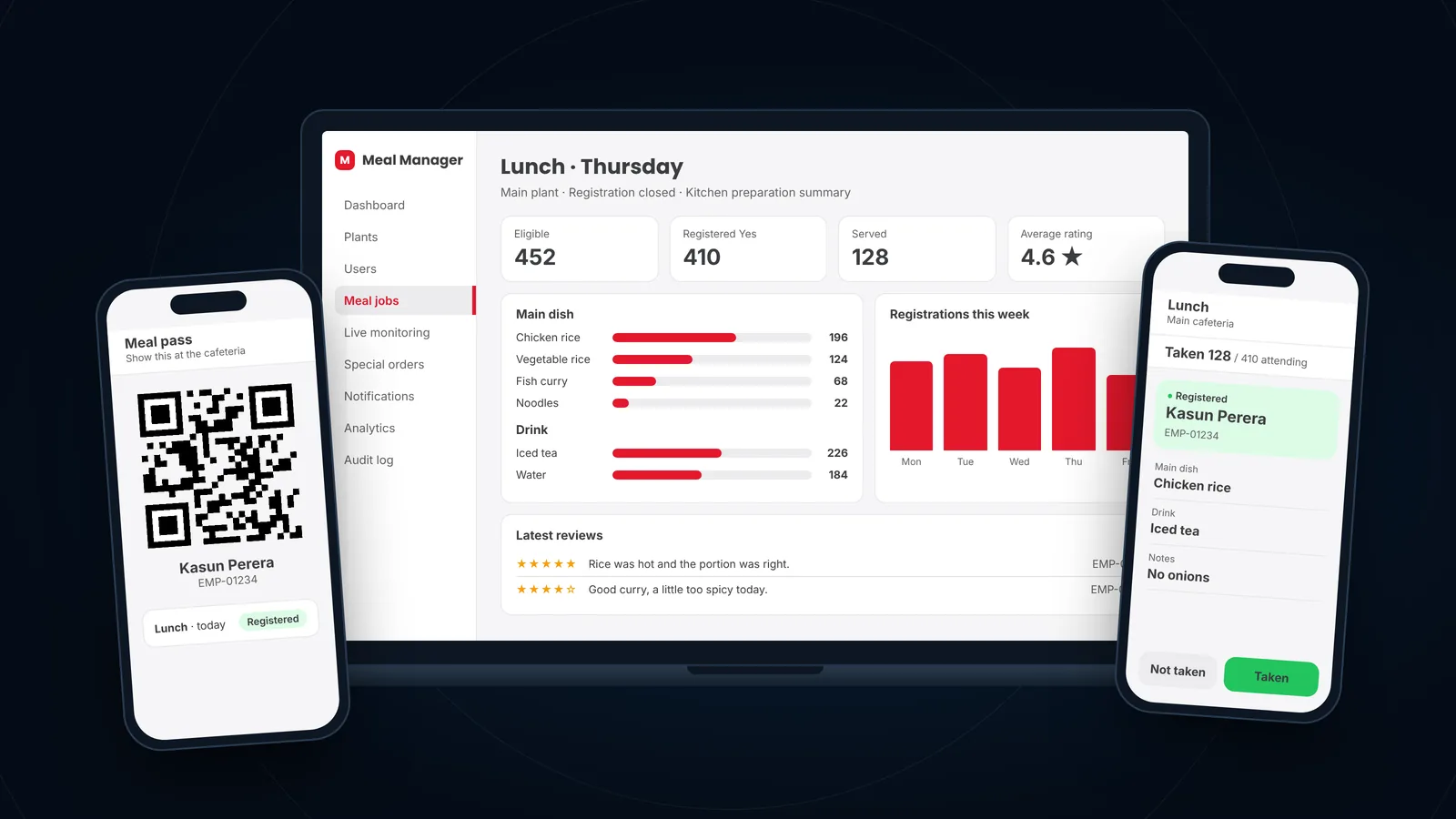
Feeding a large workforce every day is a planning problem. The kitchen has to know how many people will eat, and what they want, before it starts cooking. The cafeteria has to know who has already eaten. And the people running the programme rarely hear what employees actually thought of the food. Paper lists, shared spreadsheets and headcount guesses leave gaps at every one of those steps.
Meal Manager closes them in one system. Administrators publish a meal registration, employees answer it on their phones, the kitchen cooks from a live summary, the cafeteria serves by scanning a QR meal pass, and every meal can be rated. It runs across as many plants as a company has, each with its own people, jobs and cafeteria.
From registration to the plate
Every meal follows the same five steps, and each one is recorded as it happens.
1. Publish
Admin portal
A meal job with the questions for that meal
2. Register
Employee app
Employees answer before the deadline
3. Prepare
Kitchen
Cooks from the preparation summary
4. Serve
Cafeteria app
Scan the meal pass, record Taken
5. Rate
Employee app
Stars and a review for the meal
Three apps, one system
Meal Manager is made of three parts that share one backend, so a change in one shows up in the others straight away.
Web admin portal
Admins, plant managers, auditors
Plants and people, meal jobs, notifications, live monitoring, reports, special orders and the audit log.
Meal Manager app
Every employee, Android and iOS
Answer meal registrations, get reminders, carry the QR meal pass and rate each meal.
Meal Manager Admin app
Cafeteria staff, Android and iOS
Scan meal passes at the counter, see each registration and record Taken or Not taken, online or off.
The admin portal: plan every meal
The web portal is where meal programmes are run. A meal job is a short form for one meal at one plant, such as tomorrow's lunch, with a registration deadline and the questions the kitchen needs answered.
Meal job builder
Yes/No, single and multiple choice, short and long text, and number questions. Make any of them required, or show one only when an earlier answer calls for it, and check it all in a live phone preview.
Repeating jobs
Turn a job into a weekly series: every day, weekdays or chosen days, with skip dates for holidays. Each day's job is created and published a few days ahead, and a series can be paused, edited or ended.
Notifications and reminders
Push a notification when a job opens and schedule reminders before the deadline, to everyone or only to people who have not answered yet, with delivery tracked per person.
Live monitoring
Follow registrations as they come in for every open job, and tell a deliberate No apart from someone who simply has not answered.
Analytics and reports
Response rates, meal preference counts, comparisons between plants, demand trends and a kitchen preparation summary, exported to CSV or Excel.
Plants and people
Add plants and employees one by one or with a CSV import wizard that checks every row, lets you fix mistakes in place and reports what it imported.
Jobs move through a clear lifecycle: draft, scheduled, open, then closed or cancelled. An admin can close a job early, duplicate it for the next day or reopen it, and a reopen is recorded in the audit log.
The employee app: register in seconds
Employees sign in with their employee ID or email and see their meals in three lists: open now, upcoming and recently closed. Answering a registration takes a few taps, and if the job allows it they can change their answer until the deadline.
- Push notifications when a meal opens and reminders before it closes; tapping one opens the meal.
- A personal QR meal pass that works offline once loaded and opens at full screen brightness for fast scanning.
- Today's meals and whether each one has been served, right beside the pass.
- A history of past registrations, each marked Taken or Not taken.
- A one to five star rating and an optional written review for each meal, open for two days after the meal.
- Available in English and Sinhala.
The cafeteria app: serve in a scan
At the counter, cafeteria staff pick the meal they are serving and start scanning. Each meal pass brings up the employee's name, ID and exactly what they registered for, so the right plate goes to the right person. One tap records the meal as Taken or Not taken, and the camera is ready for the next person.
Pass
Employee app
Kasun Perera
EMP-01234 · Main plant
Lunch · Main cafeteria
Cafeteria app
Registered
Kasun Perera
EMP-01234
Main dish
Chicken rice
Drink
Iced tea
Notes
No onions
Keeps working offline
The app downloads the meal's list of people when serving starts, so scanning and recording carry on without a connection and sync as soon as it is back.
No meal served twice
A second scan shows that the meal was already taken, with the time and who recorded it. If two counters record the same person offline, the first to sync wins and the other is flagged for an admin.
Manual search
Someone forgot their phone? Find them by name or employee ID and serve them the same way.
Walk-ins still count
People who did not register, or answered No, can still be served. Their record shows it, so the portal can highlight the gap between plan and plate.
Every record reaches the portal, where admins see served counts, open conflicts and each meal's ratings and reviews. When a meal is recorded as Taken, the employee gets a thank-you notification and a prompt to rate it.
Special orders, with two approvals
Not every meal is a registration. Officers can order items from their plant's special order menu, such as tea, coffee or snacks for a meeting, for a set date and time. Each order needs approval from the officer's first and then second approver before the cafeteria sees it. Orders still waiting when their time arrives expire on their own, and served orders can be rated like any meal.
Officer orders
Items, date and time
1st approver
Approves or rejects
2nd approver
Approves or rejects
Cafeteria serves
Records Taken
Built for companies with many sites
Each person has a role, and every role except super admin is limited to the plants it has been given. The API enforces this on every request, not just the screens, so records from another plant are never shown. Admins can only create roles below their own.
| Role | What they can do |
|---|---|
| Super admin | Everything, across every plant, including system settings. |
| Company admin | Runs the plants they are given and can reopen closed jobs. |
| Plant admin | Users, meal jobs, notifications and special orders for their own plants. |
| Auditor | Read-only access to everything in scope, plus the audit log and exports. |
| Cafeteria staff | The cafeteria app only, to serve meals at their plants. |
| Employee | The employee app only: register, carry the pass, rate meals. |
Secure by design
A pass that can't be forged
The meal pass carries a random token, not the employee ID, so nobody can make a working pass from a colleague's number. An admin can reset any pass from the portal.
A full audit log
Every administrative change is recorded with who made it, when, and what changed, field by field.
Protected sign-in
Passwords are hashed with Argon2id, sign-in is rate limited, and portal sessions are protected against cross-site request forgery.
Encrypted on the device
The cafeteria app keeps its offline data in an encrypted database, and both apps store sign-in tokens in the phone's secure storage.
How it is built
The web portal and both mobile apps talk to one REST API, which holds every permission check and business rule. The rules for answers, deadlines and imports live in a shared package, so the portal's live preview and the server always agree. A background worker creates each day's repeating jobs, opens and closes jobs on time and sends reminders through Firebase Cloud Messaging.
Web admin portal
Next.js, in the browser
Employee app
Flutter, Android and iOS
Cafeteria app
Flutter, encrypted offline store
REST API
Fastify, one set of shared rules
PostgreSQL
Data, sessions, audit log
Background worker
Repeating jobs, deadlines, reminders
Push notifications
Firebase Cloud Messaging
- Time zone aware. Deadlines and meal dates follow the company's own time zone, wherever the server runs.
- Exports the kitchen can use. Preparation summaries and reports download as CSV or Excel.
- Local language. The employee app ships in English and Sinhala.
- Planned ahead. Repeating jobs are created a few days ahead, so each day's registration is ready before it opens.